
FREE · NO SIGN-UP · FILLABLE PDF
Free Invoice Template (Fillable PDF)
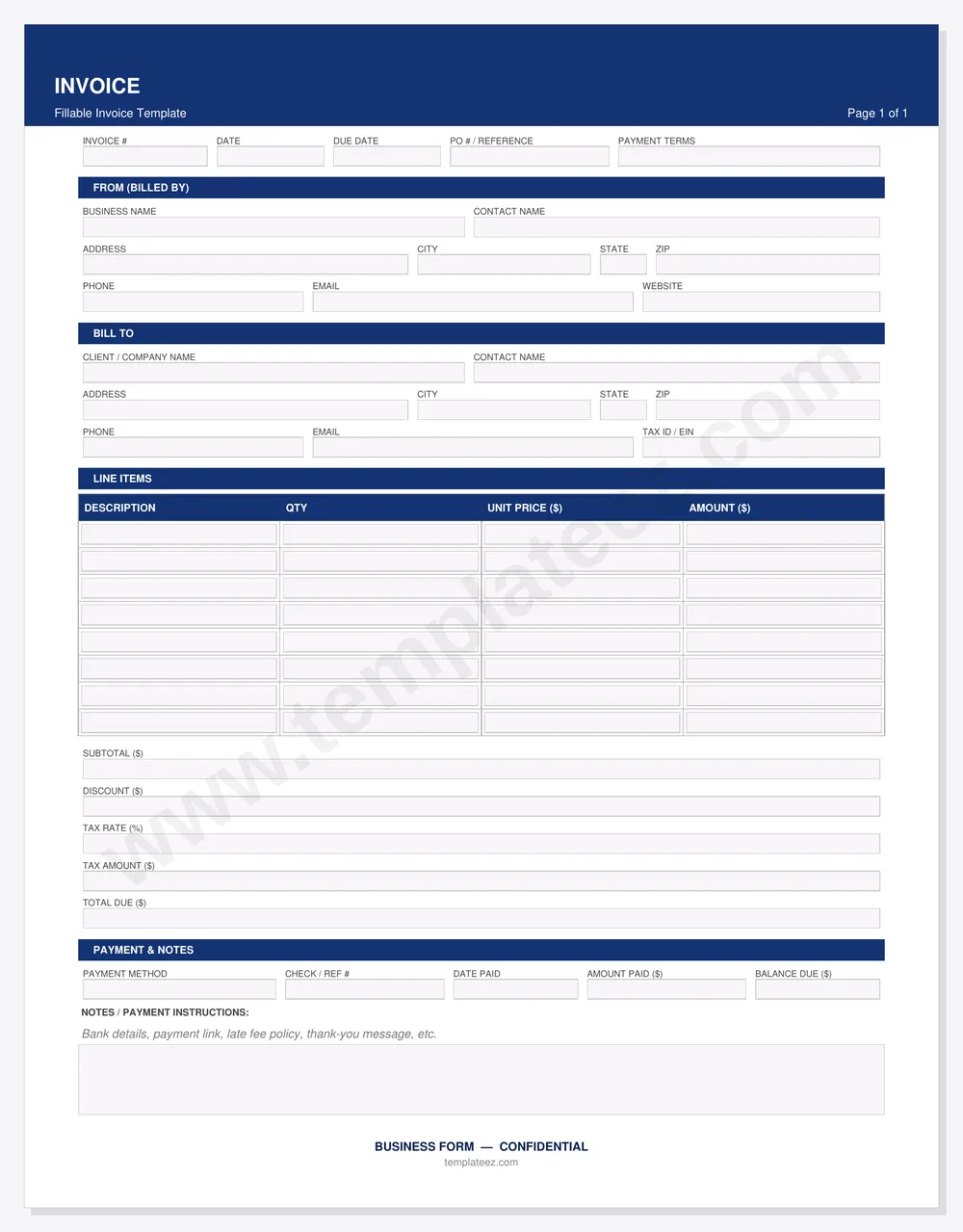
A clean, professional invoice you can fill out on your computer or phone, save, and send. Built for contractors, freelancers, and small service businesses. No software, no account, no watermark.
- Invoice #, date, due date, PO / reference and payment terms
- Your business and your customer's details, side by side
- 8 line items with quantity, unit price and amount
- Subtotal, discount, tax rate, tax amount and total due
- Payment method, check / ref # and balance due
PDF · 1 page · opens in Adobe Reader, Chrome, Edge, Preview
Your invoice is downloading. Want to get paid faster?
Invoices get disputed when the job was never written down. Pick your line of work and get the intake form and client questionnaire built for it: scope, access, approvals and sign-off captured before you start.
The rest of the paperwork, done right
An invoice is the last step. These are the documents that make sure it gets paid without an argument.
Estimate / Quote
Itemized scope, exclusions, validity period and customer sign-off — so the invoice matches what they agreed to.
$9.99
View estimate →General Receipt
Payer, amount, method and what it was for. Hand it over the moment you get paid in cash or by check.
$9.99
View receipt →Pick Any 5 Forms
Estimate, receipt and the intake forms for your trade, all in one go. Mix and match from the whole library.
$69.99
Build your 5 →How to fill out this invoice
- Number it. Use a simple running sequence (1001, 1002…) so you and your customer can refer to it.
- Set the dates and terms. Invoice date, due date, and terms such as “Net 15” or “Due on receipt”.
- Fill in both parties. Your business name, address, phone, email and website; then the customer's name, address and tax ID if they need one.
- List the work. One line per service or item, with quantity, unit price and amount.
- Total it. Subtotal, any discount, tax rate and tax amount, then the total due.
- Tell them how to pay. Put your payment link, bank details or check instructions in the notes, then save the PDF and send it.
Intake forms for every trade and practice
Templateez is a library of 192 fillable PDF forms — professional intake forms and client questionnaires for contractors, healthcare, legal and professional services. Popular with invoice users:
Frequently asked questions
Is this invoice template really free?
Yes. The fillable PDF invoice is free to download and use for your business, with no sign-up and no watermark on what you send your customers.
How do I fill out the invoice?
Open the PDF in Adobe Acrobat Reader, Chrome, Edge, or Preview. Click into any field and type: your business details, the customer, line items with quantity and unit price, then subtotal, discount, tax, and total due. Save it and email the PDF, or print it.
Does the invoice calculate totals automatically?
The invoice is a clean fillable form: you type the amounts in each field, so it works the same in every PDF reader, including phones and browsers that do not run form scripts.
What should an invoice include?
An invoice number, invoice date and due date, your business name and contact details, the customer's name and address, an itemized list of products or services with quantities and prices, subtotal, any discount, sales tax, the total due, and how to pay.
Can I use it for contractor, freelance, or service work?
Yes. It is built for trades, freelancers, consultants, and small service businesses that bill by the job, the hour, or the item.
What else do I need besides an invoice?
Most service businesses also send an estimate or quote before the job, take down the job details on an intake form, and hand over a receipt when paid. Templateez has fillable PDFs for each step.