
Home Improvement Contract Template
Create a clear contract for a remodel, repair or installation job in minutes. Signing at the customer's kitchen table? It adds the federal 3-day right-to-cancel notice, filled in with the right deadline. PDF and editable Word.
One-time price · PDF + editable Word (.docx) · no account, no subscription
Create my home improvement contract →- Answer a short questionnaire — about 5 minutes
- Your names, terms and options written into the document
- Developed under the direction of a licensed attorney; plain-English, no fill-in-the-blank gaps
- Your answers never leave your browser
Before you use it: check your state’s rules
Home improvement work is regulated by states, and often by counties and towns. The contract covers the terms common to most states and the federal 3-day cancellation rule, and it defers to homeowner-protection laws in any conflict. Paste anything your state requires into the Additional Clauses box. Check these items first:
- License or registration: many states and cities require home improvement contractors to be licensed or registered, and to print the number on the contract (for example, New Jersey requires the registration number).
- Required contract contents and notices: some states prescribe specific wording, type sizes or placement (California, for example, has detailed home improvement contract and notice requirements). Use your state's exact wording.
- Deposit limits: some states cap the down payment (for example, California limits it to the lesser of 10% or $1,000).
- Cancellation rights: the federal notice is added automatically for sales at the home. Some states give longer periods or extra protections for older homeowners, emergency repairs or sales by phone.
- Language: if you made the sales presentation mainly in another language, the contract and the cancellation notice must be in that language too.
- Lien notices: many states require a written notice to the owner about mechanics' liens before work begins or with the contract.
- Lead-safe work: for homes built before 1978, give the EPA "Renovate Right" pamphlet before work and use an EPA-certified firm when disturbing paint.
- Financing: if you arrange financing, federal Truth in Lending and the 3-day rescission rule for home-secured credit may also apply.
This document is a template, not legal advice. Have an attorney licensed in your state review it before use.
What’s inside
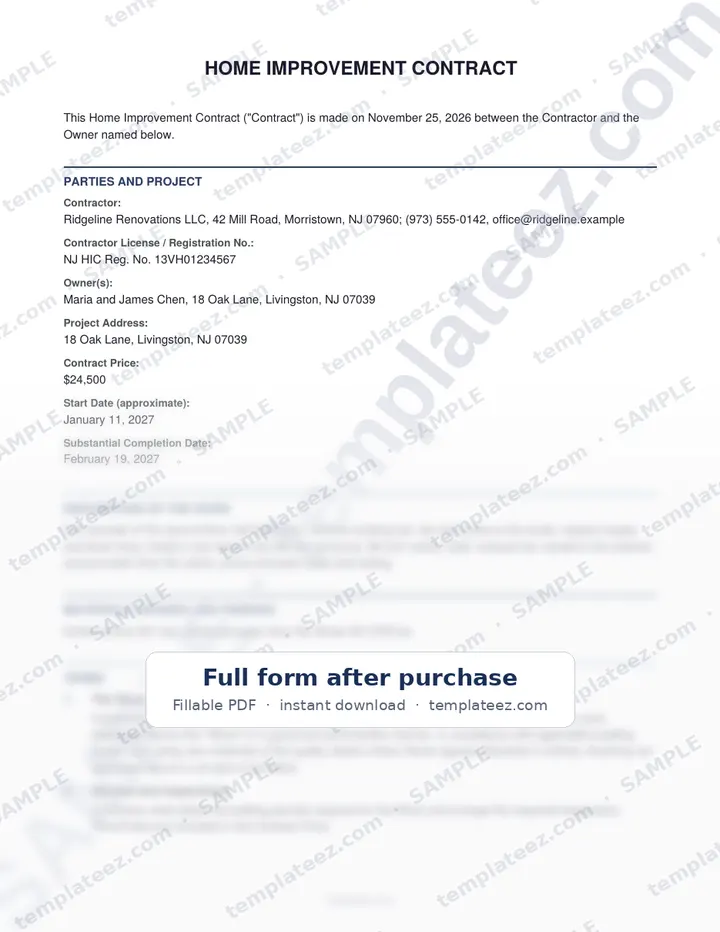
- Contractor and owner details, with license or registration number
- Description of the work and the materials, brands and finishes
- Building permits: who pulls them and who pays
- Start and substantial completion dates, with fair delay extensions
- Contract price, deposit, progress payments and final payment, with punch-list holdback
- Written, signed change orders before extra work
- Concealed conditions (rot, mold, code problems) handled by change order
- EPA lead-safe clause for homes built before 1978
- Insurance, subcontractors, lien protection, cleanup and workmanship warranty
- Default, cure period and termination
- Federal 3-day right to cancel and two completed Notice of Cancellation forms when signed at the home
- Additional Provisions section for notices or terms your state or town requires
- Optional: lien waivers with each payment, allowances, mediation, job photos and yard sign
Who it’s for
Remodelers, general contractors, handymen and trade contractors (roofing, HVAC, plumbing, electrical, flooring, decks, windows) who sign residential jobs with homeowners.
How it works
1. Answer
Fill in the parties, dates, money terms and choices in a short step-by-step form.
2. Add clauses
Optional add-on clauses, priced individually, for the situations that need them.
3. Download
Pay once and your PDF and Word files download instantly. Print, sign or e-sign.
Ready in minutes
$29.99 for the complete document in PDF and Word. 30-day refund if it’s not right for you.
Start the Home Improvement Contract →Frequently asked questions
When does the 3-day cancellation notice apply?
The FTC Cooling-Off Rule covers sales of $25 or more made at the buyer's home, and $130 or more at other temporary locations away from the seller's place of business. When you choose "at the Owner's home," the contract adds the required statement near the signatures and two completed Notice of Cancellation forms, with the deadline (the third business day, skipping Sundays and federal holidays) filled in. Many states have their own home-solicitation or home-improvement rules that can be stricter.
My state requires specific wording. Where does it go?
Paste it into the Additional Clauses box. It prints as an Additional Provisions section of the contract. If your state requires the wording in a specific place or type size, move it there in the Word file.
Can I use it for commercial jobs?
It is written for work on a home. For commercial work, use a commercial construction contract.
What do I get?
A finished document with your names, terms and selected clauses written in, as a PDF ready to sign and an editable Word (.docx) file. Generation happens in your browser.
Is this legal advice?
No. The documents are drafted to standard legal conventions, but laws vary by state. Have an attorney licensed in your state review anything important before you sign.
Other documents you can generate
Templateez documents may create binding obligations. Nothing on this page or in the generated document is legal advice, and not every provision may be enforceable in every jurisdiction. Consult an attorney licensed in your state before signing.